Opportunities
Section: Customer Relationship Management
URL:/admin/opportunities
Page title: (2) Oportunități
Overview
Opportunities represent qualified deals with an associated value, expected close date, and pipeline stage. They are the link between a lead and a closed contract or invoice.
Business value
Represents qualified deals — the bridge between a lead and a closed contract — with value, expected close date, probability, and stage. The basis for revenue forecasting and sales-team accountability.
- Who uses it: Sales reps, sales managers, finance, executives
- Key benefit: Turns a "feeling" about the pipeline into a defensible number on a forecast.
- Metrics it influences: Pipeline coverage ratio, weighted forecast accuracy, sales velocity
Typical use cases:
- Forecast next quarter's bookings with weighted-pipeline math
- Identify at-risk deals (closing this month, stuck in negotiation)
- Tie commission accrual to opportunity stage and value
At a glance

Accessing this module
From the admin sidebar, navigate to Opportunities, or open the URL directly:
/admin/opportunities
List view
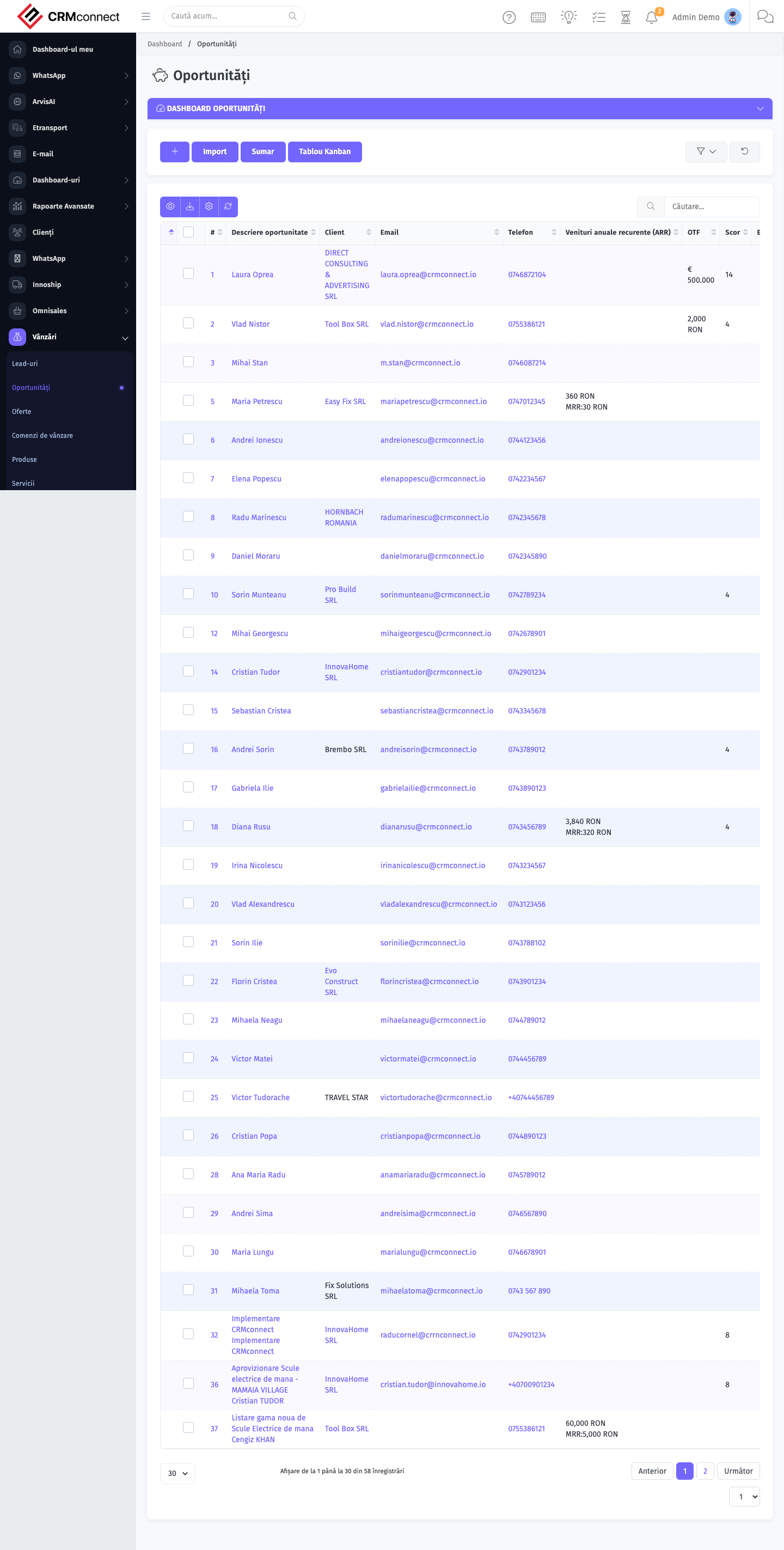
The list view shows existing opportunities records. Use it to search, filter, sort, and bulk-act on items.
Common actions
- View existing records — open Opportunities from the sidebar to see the list view.
- Search and filter — use the search box and column filters to find records.
- Create a new record — click the Add / New button (or follow the "Create" URL above) and fill in the required fields.
- Edit a record — click a row to open the detail view, then use the edit action.
- Delete a record — use the row's delete action; deletion may be soft or hard depending on the module.
- Bulk operations — select multiple rows via the checkboxes and apply a bulk action from the toolbar (export, delete, status change, etc., where supported).
Keep the Expected Close Date and Value fields updated as deals progress — these two fields drive the pipeline forecast reports. Stale dates inflate your pipeline and make revenue forecasts unreliable.
Closing an opportunity as "Won" does not automatically create an invoice. You still need to create a quote, order, or invoice manually — or set up a recurring invoice if the won deal is a subscription. Link the document back to the opportunity for a complete deal history.
API
This module is available via the REST API.
Authentication. All API requests require the header authtoken: <token> (generate one at /admin/api/api_management).
Base URL. https://your-domain.tld/api/
Key endpoints:
| Method | Path | Purpose |
|---|---|---|
POST |
{{base_url}}opportunities |
Add new Opportunity |
GET |
{{base_url}}opportunities?nr_page=&per_page= |
List all Opportunities |
GET |
{{base_url}}opportunities/1 |
One Opportunity |
GET |
{{base_url}}opportunities/search/test |
Search Opportunity Information |
PUT |
{{base_url}}opportunities/:id |
Update Opportunity |
DELETE |
{{base_url}}delete/opportunities/42 |
Delete Opportunity |
See the full payload schemas, query parameters, and example responses in the API reference (`Opportunities`).
Captured: 2026-05-10T09:51:26.776Z · Source: demo.crmconnect.io/admin/opportunities