Internal Transfers
Section: Warehouse Management (WMS)
URL:/admin/warehouse/manage_internal_delivery
Page title: (2) Note de transfer intern
Overview
Internal transfer notes move stock between two warehouses inside your company.
Business value
Moves stock between two of your own warehouses — keeping the company-wide inventory total constant while updating per-location balances.
- Who uses it: Warehouse, logistics, operations
- Key benefit: Balances stock across the network and supports just-in-time delivery from regional hubs.
Typical use cases:
- Replenish a retail store from central warehouse
- Move slow-moving stock to a clearance location
At a glance

Accessing this module
From the admin sidebar, navigate to Internal Transfers, or open the URL directly:
/admin/warehouse/manage_internal_delivery
List view
The list view shows existing internal transfers records. Use it to search, filter, sort, and bulk-act on items.
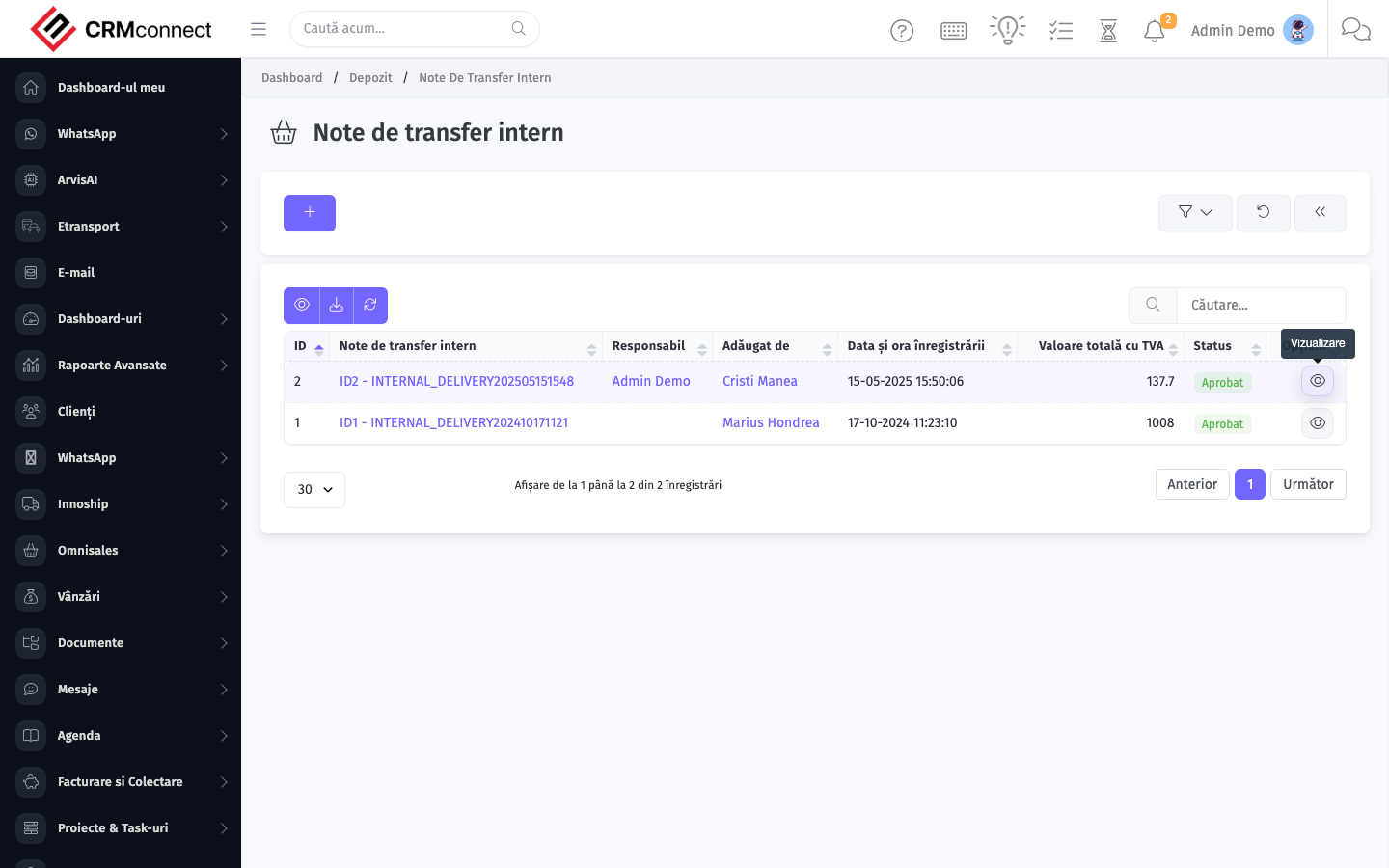
Create / edit form
Open the create form to add a new internal transfers record. Editing an existing record uses the same form pre-populated with current values.

Common actions
- View existing records — open Internal Transfers from the sidebar to see the list view.
- Search and filter — use the search box and column filters to find records.
- Create a new record — click the Add / New button (or follow the "Create" URL above) and fill in the required fields.
- Edit a record — click a row to open the detail view, then use the edit action.
- Delete a record — use the row's delete action; deletion may be soft or hard depending on the module.
- Bulk operations — select multiple rows via the checkboxes and apply a bulk action from the toolbar (export, delete, status change, etc., where supported).
An Internal Transfer keeps the company-wide total stock constant — it only moves balance from one location to another. If you need to record a stock variance (damage, loss, expiry), use Loss & Adjustment instead.
Use internal transfers to rebalance stock across locations before month-end reports — moving slow-moving stock to a clearance location or replenishing a retail store from central warehouse is cleaner and auditable versus manually adjusting both location balances.
API
This module is available via the REST API.
Authentication. All API requests require the header authtoken: <token> (generate one at /admin/api/api_management).
Base URL. https://your-domain.tld/api/
Key endpoints:
| Method | Path | Purpose |
|---|---|---|
GET |
{{base_url}}wms/warehouse_manage?page=1&per_page=50 |
List |
GET |
{{base_url}}wms/warehouse_manage/{{wms_record_id}} |
Get one |
POST |
{{base_url}}wms/warehouse_manage |
Create |
PUT |
{{base_url}}wms/warehouse_manage/{{wms_record_id}} |
Update |
DELETE |
{{base_url}}wms/warehouse_manage/{{wms_record_id}} |
Delete |
GET |
{{base_url}}wms/commodity_list?page=1&per_page=50 |
List |
GET |
{{base_url}}wms/commodity_list/{{wms_record_id}} |
Get one |
GET |
{{base_url}}wms/commodity_list/search/{{search_key}} |
Search |
POST |
{{base_url}}wms/commodity_list |
Create |
PUT |
{{base_url}}wms/commodity_list/{{wms_record_id}} |
Update |
DELETE |
{{base_url}}wms/commodity_list/{{wms_record_id}} |
Delete |
GET |
{{base_url}}wms/manage_purchase?page=1&per_page=50 |
List |
GET |
{{base_url}}wms/manage_purchase/{{wms_record_id}} |
Get one |
POST |
{{base_url}}wms/manage_purchase |
Create |
PUT |
{{base_url}}wms/manage_purchase/{{wms_record_id}} |
Update |
DELETE |
{{base_url}}wms/manage_purchase/{{wms_record_id}} |
Delete |
GET |
{{base_url}}wms/manage_delivery?page=1&per_page=50 |
List |
GET |
{{base_url}}wms/manage_delivery/{{wms_record_id}} |
Get one |
POST |
{{base_url}}wms/manage_delivery |
Create |
PUT |
{{base_url}}wms/manage_delivery/{{wms_record_id}} |
Update |
See the full payload schemas, query parameters, and example responses in the API reference (`WMS`).
Captured: 2026-05-10T09:51:26.776Z · Source: demo.crmconnect.io/admin/warehouse/manage_internal_delivery