Goods Receipt Note
Section: Warehouse Management (WMS)
URL:/admin/warehouse/manage_purchase
Page title: (2) Recepție mărfuri
Overview
A Goods Receipt Note (NIR) records inbound stock from a supplier delivery and updates inventory balances.
Business value
Records inbound stock from a supplier delivery (NIR — Notă de intrare-recepție). Updates inventory, books the goods into the right warehouse, and matches against the corresponding purchase order for three-way matching.
- Who uses it: Warehouse staff, procurement, finance
- Key benefit: Closes the procure-to-pay loop and keeps inventory accurate at the point of receipt.
Typical use cases:
- Verify a vendor delivery line-by-line against the PO
- Flag short or damaged shipments for vendor claims
- Trigger vendor invoice creation only after a clean GRN
At a glance

Accessing this module
From the admin sidebar, navigate to Goods Receipt Note, or open the URL directly:
/admin/warehouse/manage_purchase
List view
The list view shows existing goods receipt note records. Use it to search, filter, sort, and bulk-act on items.
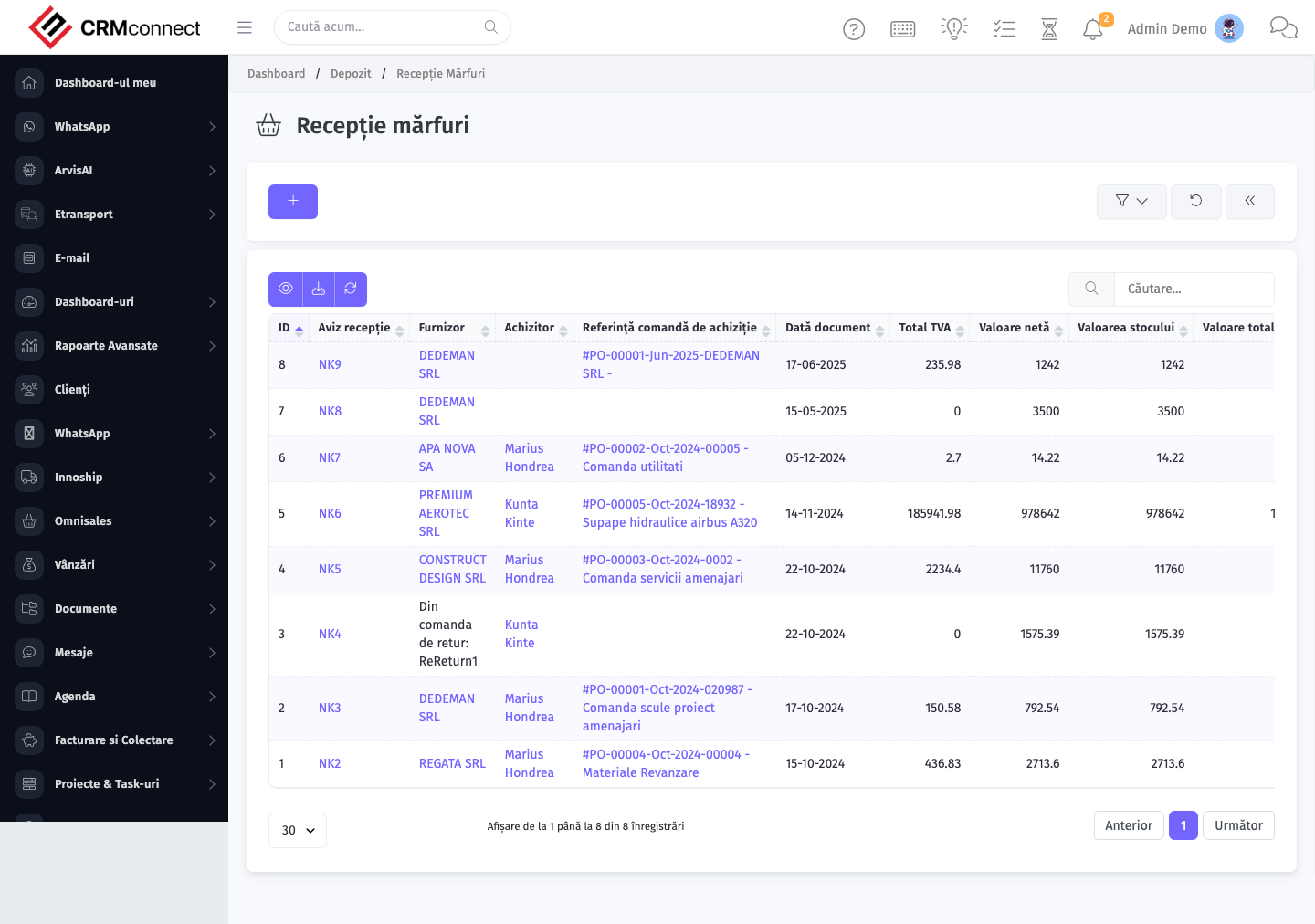
Common actions
- View existing records — open Goods Receipt Note from the sidebar to see the list view.
- Search and filter — use the search box and column filters to find records.
- Create a new record — click the Add / New button (or follow the "Create" URL above) and fill in the required fields.
- Edit a record — click a row to open the detail view, then use the edit action.
- Delete a record — use the row's delete action; deletion may be soft or hard depending on the module.
- Bulk operations — select multiple rows via the checkboxes and apply a bulk action from the toolbar (export, delete, status change, etc., where supported).
Create the GRN directly from the purchase order using the Receive action on the PO. It pre-fills the vendor, lines, and ordered quantities — you only need to confirm or adjust for discrepancies, saving time and preventing data entry errors.
Once a GRN is confirmed and stock is updated, do not delete and re-create it to fix a quantity error. Use Loss Adjustment for shrinkage or Internal Transfer to correct bin locations. Deleting a confirmed GRN reverses the stock movement without leaving a correction record.
Record short or damaged deliveries on the GRN before confirming — adjust received quantities to what was actually accepted. This creates a variance against the PO, which serves as the basis for vendor claims or returns.
API
This module is available via the REST API.
Authentication. All API requests require the header authtoken: <token> (generate one at /admin/api/api_management).
Base URL. https://your-domain.tld/api/
Key endpoints:
| Method | Path | Purpose |
|---|---|---|
GET |
{{base_url}}wms/warehouse_manage?page=1&per_page=50 |
List |
GET |
{{base_url}}wms/warehouse_manage/{{wms_record_id}} |
Get one |
POST |
{{base_url}}wms/warehouse_manage |
Create |
PUT |
{{base_url}}wms/warehouse_manage/{{wms_record_id}} |
Update |
DELETE |
{{base_url}}wms/warehouse_manage/{{wms_record_id}} |
Delete |
GET |
{{base_url}}wms/commodity_list?page=1&per_page=50 |
List |
GET |
{{base_url}}wms/commodity_list/{{wms_record_id}} |
Get one |
GET |
{{base_url}}wms/commodity_list/search/{{search_key}} |
Search |
POST |
{{base_url}}wms/commodity_list |
Create |
PUT |
{{base_url}}wms/commodity_list/{{wms_record_id}} |
Update |
DELETE |
{{base_url}}wms/commodity_list/{{wms_record_id}} |
Delete |
GET |
{{base_url}}wms/manage_purchase?page=1&per_page=50 |
List |
GET |
{{base_url}}wms/manage_purchase/{{wms_record_id}} |
Get one |
POST |
{{base_url}}wms/manage_purchase |
Create |
PUT |
{{base_url}}wms/manage_purchase/{{wms_record_id}} |
Update |
DELETE |
{{base_url}}wms/manage_purchase/{{wms_record_id}} |
Delete |
GET |
{{base_url}}wms/manage_delivery?page=1&per_page=50 |
List |
GET |
{{base_url}}wms/manage_delivery/{{wms_record_id}} |
Get one |
POST |
{{base_url}}wms/manage_delivery |
Create |
PUT |
{{base_url}}wms/manage_delivery/{{wms_record_id}} |
Update |
See the full payload schemas, query parameters, and example responses in the API reference (`WMS`).
Captured: 2026-05-10T09:51:26.776Z · Source: demo.crmconnect.io/admin/warehouse/manage_purchase