Custom Fields
Section: Settings & Administration
URL:/admin/custom_fields
Page title: (2) Câmpuri personalizate
Overview
Define custom fields on any record type to capture data specific to your business.
Business value
Define custom fields on any record type — capture data specific to your business that doesn't fit the out-of-the-box schema. The escape hatch that prevents "we'll just keep it in a spreadsheet".
- Who uses it: IT admin, ops, business analysts
- Key benefit: Adapts the platform to your business without expensive customisations.
Typical use cases:
- Add "Industry" field on clients for ICP analysis
- "Project Code" custom field on invoices for client compliance
- "Source Channel" on leads for attribution
At a glance

Accessing this module
From the admin sidebar, navigate to Custom Fields, or open the URL directly:
/admin/custom_fields
List view
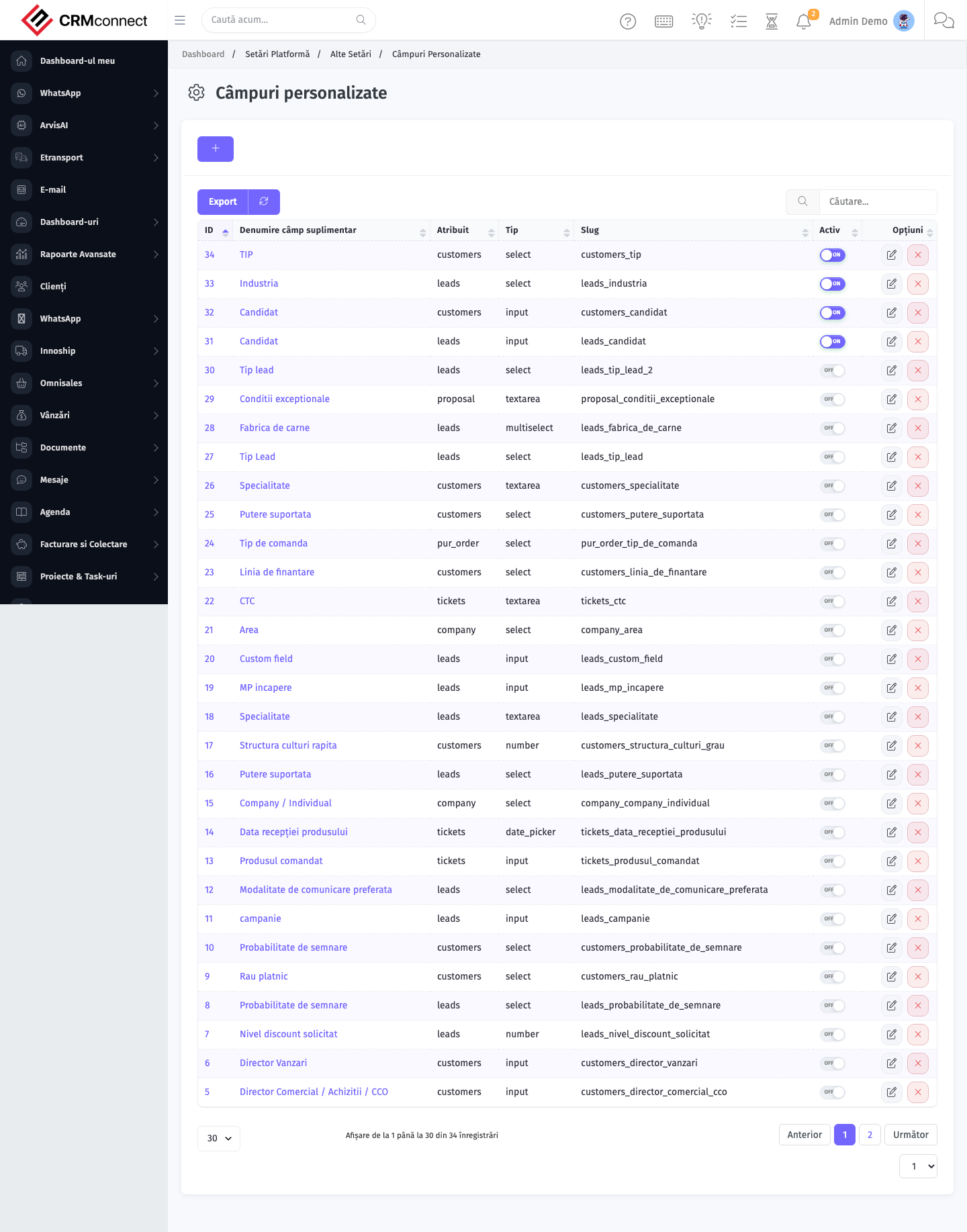
The list view shows existing custom fields records. Use it to search, filter, sort, and bulk-act on items.
Common actions
- View existing records — open Custom Fields from the sidebar to see the list view.
- Search and filter — use the search box and column filters to find records.
- Create a new record — click the Add / New button (or follow the "Create" URL above) and fill in the required fields.
- Edit a record — click a row to open the detail view, then use the edit action.
- Delete a record — use the row's delete action; deletion may be soft or hard depending on the module.
- Bulk operations — select multiple rows via the checkboxes and apply a bulk action from the toolbar (export, delete, status change, etc., where supported).
Deleting a custom field permanently removes all data stored in that field across every record in the system — there is no undo. Export or note down the data before deleting if there is any chance you'll need it.
Use the Dropdown field type with predefined options (instead of free-text) for any field you'll use in filters or reports. Free-text fields accumulate spelling variants ("Cluj", "Cluj-Napoca", "cluj") that silently break segment grouping.
API
This module is available via the REST API.
Authentication. All API requests require the header authtoken: <token> (generate one at /admin/api/api_management).
Base URL. https://your-domain.tld/api/
Key endpoints:
| Method | Path | Purpose |
|---|---|---|
GET |
{{base_url}}custom_fields/:type |
List all Custom Fields By Type |
GET |
{{base_url}}custom_fields/items/3 |
One Invoice |
See the full payload schemas, query parameters, and example responses in the API reference (`Custom Fields`).
Captured: 2026-05-10T09:51:26.776Z · Source: demo.crmconnect.io/admin/custom_fields